Apple OSX and the challenges of collection, 2026 Edition
Mar 31, 2026
We get emails and requests from time to time surrounding collection of Apple OSX machines, what works, and what doesn't. In fact, we put together a blog post on the topic a few years ago and have it linked below. Sadly, the long and short it is as follows:
The days of doing full disk imaging/collection are going away if not already gone completely.
How did we get here?

It all started back in the High Sierra days. Apple decided to restrict even the root/admin users ability to read from the raw root disk. For those who have experience with the historical process of full disk imaging, it was reasonably straight forward. You would make an image of /dev/rdisk0. Rdisk0 is the root disk on the Apple OSX operating system.
Except starting with High Sierra you'd get a permission denied error. In fact, even if you executed the same commands as root/admin you'd get the same thing. The only way around it was to disable System Integrity Protection (SIP). This required you to be on the physical machine and reboot it twice, once into a recovery environment where you'd run a command, then back into the main operating system. (More on this here).
As you can imagine, this didn't go over well for remote forensics.
Listen, we get it. Apple is looking out for their customers and our use cases are remarkably niche.
So what did we do?
We have set up two options for collecting data from remote Apple computers. The first? All versions of F-Response Consultant or higher (including Universal and Collect) support Agentless, our SSH/SFTP collection mechanism. Check out our Agentless Mission Guide for more information.
The second is F-Response Collect. This relatively new client/server version of F-Response includes executables for Apple that are capable of collecting file and folder content.
But neither method can get to Documents, Desktop, and Downloads without help.
Yes, there's another step.
We've outlined it below, but the long and short of it is as follows:
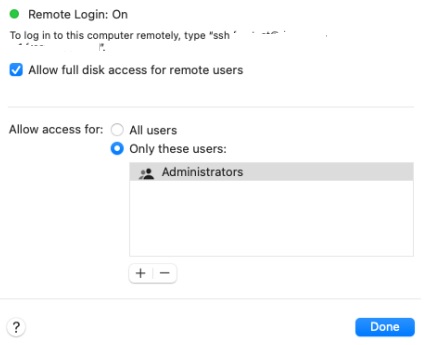
You have to enable Full Disk Access for either F-Response Collect (if you are using that version) or Remote Login (if you are collecting via Agentless).
Full Disk Access does not mean what you think it means. It just means you have access to Documents, Downloads, and Desktop. I know, it's super confusing from a forensics perspective. I'm sorry.
To enable Remote Login for Full Disk Access you need to go to Preferences->Sharing->Remote Login, slide the toggle, then click the little "i" next to it. This will give you additional details. You need to check "Full Disk Access".
You'll find more details on F-Response Collect and Apple in the mission guide on our website: Apple OSX and F-Response Collect
That's it for this year's version of F-Response and OSX. Happy collecting!
We hope this helps when dealing with Apple systems in the future, at least until it doesn't!
Warmest Regards,
M Shannon